How is it possible to press all keybinds??

1 pages Page 1
L
Lenivik
Pre-Searing Cadet
#1
So this is a problem i have with Guild wars and mmos in general. How is it possible to reach keys 6-9 while still having your fingers on wasd for movement.
Do u change keybindings or just reach out to press them. I really dont like clicking abilities with the curser, It wastes time.


So could someone kindly explain.


Thank you
G
Gabs88
Desert Nomad
#2
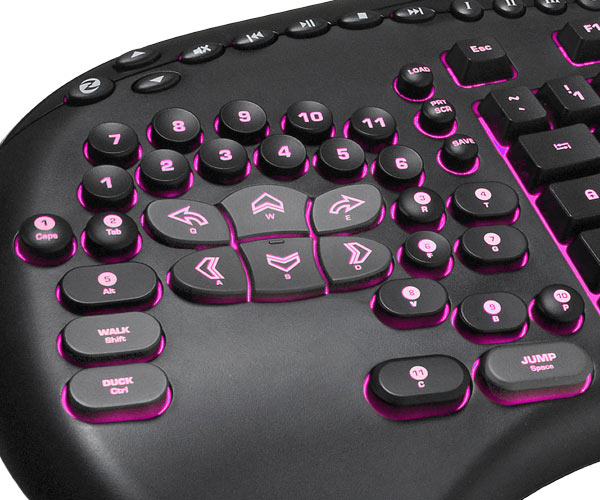
Change keybindings, and get a new keyboard.


That's mine, keys are generally better placed and more reachable. And skills such as capslock has been repurposed. Can easily reach 3 skills with my thumb for instance.

Even with that though you need to rebind. Many people bind keys to their mouse as well. That said, guild wars is absolute crap when it comes to binding keys. You can't use control modifiers, and you can't use shift modifiers (Modifiers would be combinations such as ctrl+1 or shift+1). That severely hinders the amount of easily accessible combinations you can use.
L
Lenivik
Pre-Searing Cadet
#3
Thanks 4 the reply. Thats the merc stealth ay. Ive been looking into getting a good mouse with alot of buttons but i cant seem 2 find 1. Its either cheap build quality (naga) or fail drivers (mmo 7). Ill just have 2 keep looking i guess
o
ogre_jd
Wilds Pathfinder
#4
I click the out of reach ones. Frankly, if I'm playing a build in any MMORPG that requires constant number key presses beyond 1-4, it's not worth my time. :P

For GW, I've generally got my basic combat rotation on 1-3, with a fourth attack or an IAS on 4 (depending on class). 5 tends to be my IMS (easy enough to reach so it can be kept up in HM), when I'm using one. 6-8 are either for special situations or pre-battle warming up, with 8 always being my rez (again, if I'm carrying one). So no real need for a special keyboard and it's rarely a problem to click the less frequently-used stuff over there on the right... It's all in how you set out your bar.
G
Gabs88
Desert Nomad
#5
Quote:
Originally Posted by Lenivik View Post
Thanks 4 the reply. Thats the merc stealth ay. Ive been looking into getting a good mouse with alot of buttons but i cant seem 2 find 1. Its either cheap build quality (naga) or fail drivers (mmo 7). Ill just have 2 keep looking i guess
I tested my responce time with Razer vs my Mx518 a little while back, and what I found was quite surprising. My responce time was consistently 15-20% faster with a light Razer when with the Mx518. That said, I'm not gonna reccomend a Razer. But something very similar that I tried a while back, that is the closest I've had to an epiphany on the mouse front since my original razer almost 10 years ago.

Mionix Naos 5000

At least for me, thats the best ergonomy I've ever experienced. And buttons on the side was good too. I think 15% faster responce times on normal clicks is more importaint then having a ton of buttons.
Absolute Destiny
Absolute Destiny
Wilds Pathfinder
#6
I just don't use WASD in battle unless an AoE/Trap is in effect.

C, SPACE, keybinds. Rinse, repeat until battle's over.

Not that I claim any particular preeminence on the subject.
j
jcegt87
Frost Gate Guardian
#7
i use the num pad

WASD to move with my left hand and Num Pad to use skill

i switch to mouse when moving and when fighting right hand moves over to Num pad, thats the way i always have and always will use , also with my G510 keyboards i use my pinky to press the macro keys
Sagittario
Sagittario
Krytan Explorer
#8
Use WSAD for movement and mouse for activating skills.
L
Lenivik
Pre-Searing Cadet
#9
Interesting playstyle jcet87 ill try that out lol.
E
EtherealSkys
Frost Gate Guardian
#10
I have skills 1-4 as numbers 1-4.

I have strafes bound to a and d.

Skills 5-6 on q and e.

I then have 2 mouse buttons for 7-8, but alternatively, keys f, c, x, and z could be used. (If you don't have anything bound to any of those already.)
zpsycho
zpsycho
Ascalonian Squire
#11
This guy talks a lot but the his idea is sweet.

http://www.youtube.com/watch?v=wrWFwW3ItnQ

I personally have laptop so my keyboard is so small I can easily stretch anywhere
m
marnick
Ascalonian Squire
#12
Quote:
Originally Posted by Lenivik View Post
Thanks 4 the reply. Thats the merc stealth ay. Ive been looking into getting a good mouse with alot of buttons but i cant seem 2 find 1. Its either cheap build quality (naga) or fail drivers (mmo 7). Ill just have 2 keep looking i guess
I use the razer naga for 2 years now, pretty intensely I may add. I have never had a problem of "cheap build quality". It is a very decent mouse, so maybe you should just try if you haven't.

If anything, razer has the highest build quality for mouses.

As for keybinds in gw1, I use f1 f2 f3 f4 for the 5678 skills which works very good for me. I wonder how to do this in gw2 however with the toolbelt :/
L
Lenivik
Pre-Searing Cadet
#14
I plan 2 by myself the Cyborg MMO 7 mouse. Has heaps of buttons and adjustability. I love the look of the Razer Naga but i dont really wanna risk it since ive read sooooo much on how bad the build quality of razer products are.
Dzjudz
Dzjudz
Furnace Stoker
#15
My Diamondback has lasted the past 6 years and still going strong, my DeathAdder has served me well the past 3 years. I don't know how people treat their mice, but my (and my family's) razers have all been working extremely satisfactorily (FPS, RPG, MMO, etc).
xxlebox
xxlebox
Ascalonian Squire
#16
I use my Mouse Forward and Backward buttons for Skill 1 and 2, respectively. They should be your quick reaction or spam skills. Q and E activate Skill 3 & 4, they're usually two more skills that you want to be able to reach really quickly. Then last but not least buttons 1 through 4 function for Skills 5 to 8.

Works quick and easy.