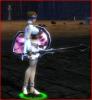
Strange graphical glitches (Images inside)

1 pages Page 1
S
Solemshay
Pre-Searing Cadet
#1
Hey, I've been playing guild wars for a while, but lately there's been some really wierd problems with the character models:

http://s342.photobucket.com/albums/o...ent=gwwtf1.jpg

Parts of the body are missing or completely oversized, but most commonly this wierd streched effect:

http://s342.photobucket.com/albums/o...rent=gw004.jpg

The problem seems to be with the armour models, not the character models, cuz if I remove the armour then there is no more problems:

http://s342.photobucket.com/albums/o...ent=sdfghj.jpg

This happens on all graphic settings and screen sizes, all my drivers are up to date, and compatable with GW, I've been playing for a while on this pc and it's only just happened now,

Is there a solution, or can I edit the armour set models so these problems wont occur anymore,

ty in advance
B
Bob Slydell
Forge Runner
#2
These sorta things just pop up out of nowhere, I remember anet had to do a fix for people with integrated intel chipsets....
B
Bloodthirsty Bob
Pre-Searing Cadet
#3
I've been seeing the exact same "stretching" effect for about a month now myself. It sometimes gets so bad I can't continue playing and even still continued after my recent reformat. I just assumed my GPU was crapping out.
sky stars
sky stars
Ascalonian Squire
#4
ide put my money on dead g gard or dieing PSU
S
Solemshay
Pre-Searing Cadet
#5
I dont think so, I have no problems on any other games with graphics
d
dartz180
Ascalonian Squire
#6
corrupted .dat maybe? try -image
Tenebrae
Tenebrae
Forge Runner
#7
Quote:
Originally Posted by dartz180 View Post
corrupted .dat maybe? try -image
Pretty much that. GW stresses processor and graphics processor. If that thingies happen to you ALWAYS no matter how much time was your PC on and your graphic card is not burning ...... reinstall and -image :/
S
Solemshay
Pre-Searing Cadet
#8
Quote:
Originally Posted by Tenebrae View Post
Pretty much that. GW stresses processor and graphics processor. If that thingies happen to you ALWAYS no matter how much time was your PC on and your graphic card is not burning ...... reinstall and -image :/
Tried that, has no effect, but doing -dx8 corrects the model problems, but the ground textures just turn to blank grey
moriz
moriz
??ber t??k-n??sh'??n
#9
you sure you did it properly? that looks almost exactly like a corrupted dat file. delete the gw.dat file, and restart your game with -image.

you can also tell us your computer specs. that might also come in handy.
S
Solemshay
Pre-Searing Cadet
#10
Quote:
Originally Posted by moriz View Post
you sure you did it properly? that looks almost exactly like a corrupted dat file. delete the gw.dat file, and restart your game with -image.

you can also tell us your computer specs. that might also come in handy.
I followed everything down to the letter, deleted .dat, put -image in file extension, it downloaded, I ran it and there was no change,
I've fully checked out my specs and my graphics card is supported.

When in run in directx8 mode the problem stops but the ground textures dissapear, is there any way I can manually edit these textures so they show up when I play in dx8?
S
Solemshay
Pre-Searing Cadet
#11
PROBLEM SOLVED

I added both -dx8 & -noshaders to the extension, and everything is now completely fine