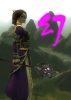
Graphics glitch. Huge white cubes instead of heads

1 pages Page 1
S
Serenifly
Pre-Searing Cadet
#1
I'm new to Guild Wars and I have this ever since I installed the game.

Pretty much exclusively in outposts some of the characters have large white, glowing cubes instead of heads. So I assume that there should be some special icon there maybe. Sometimes it also disappears after a while for one character.

See attached screenshot

Maybe this is a known issue. I played a bit, but not much, with the graphics settings, but that didn't help


System:
Athlon64 3200+
GF6800 GT with latest drivers
lightblade
lightblade
Forge Runner
#2
Caused by missing model file. There are several reasons why the file is missing.
1. Corrupted File
2. If you did not install from CD, then the file may not be downloaded yet.
3. The file have not loaded yet.

In either case, follow the guideline in here to use the -repair command to repair your GW.dat. If that didn't work, you'll have to reinstall the game.

The problem is definitely software related and have nothing to do with hardware.
Envious
Envious
Frost Gate Guardian
#3
Quote:
Right-click your 'Guild Wars' launcher, then go to 'Properties'; then, there should be a command line along the lines of this:

"C:\Program Files\Guild Wars\Gw.exe"

Change it to and add -image to the end so it should look like this:

"C:\Program Files\Guild Wars\Gw.exe" -image

Apply, then OK. Then run Guild Wars launcher; it will begin to download everything for GW of the Server, leave it for a couple of hours to download, then when it's done. Right-click again and remove the -image of the command line you added before; then your set to play.


~ Josh.
This might answer your question.
pixel.summoner
pixel.summoner
Frost Gate Guardian
#4
I feel really bad but, I have to laugh at that screenshot. It's just hilarious to see such a huge white noggin.

Best of luck on getting things sorted out though
Red_Dragon56
Red_Dragon56
Frost Gate Guardian
#5


My external harddrive got unplugged. Beat that yo
McMullen
McMullen
Krytan Explorer
#6
I had that problem a while ago too, turned out to be faulty RAM which forced me to temporarily downgrade to 256mb RAM.
Hopefully it's a less serious problem for you.
A
Aecum
Ascalonian Squire
#7
well, download the fallowing programs,
Memtest86, excessGL, any 3dmark, prime95

start abusing the computer,

if memtest fails, - > memory problem motherboard problem
3dmark fails -> cpu, motherboard, graphics card
ExcessGL fails -> graphics card problem
Prime95 fails -> Cpu and motherboard,
S
Serenifly
Pre-Searing Cadet
#8
Yeah, it's possible my download got corrupted. I installed it from the CD, but itdownloaded tons of stuff. However it went very, very slow, so maybe something went wrong.

Will try that later
P
Psycosis
Pre-Searing Cadet
#9
i got the same prob however the glitch seems to only be on elementalists.
seraphite86
seraphite86
Frost Gate Guardian
#10
What I think is very amusing is there is even a shadow for the cubehead.
S
Serenifly
Pre-Searing Cadet
#11
Quote:
Originally Posted by Psycosis
i got the same prob however the glitch seems to only be on elementalists.
Now that you say it, I noticed that too

I tried the "-repair" thing and it didn't work
Downloading the files again with "-image" at the moment. That'd better fix it
P
Psycosis
Pre-Searing Cadet
#12
i too am trying the "-Image" download thing had 54,000 files to install, it could possibly fix it, and i sure hope it does kind anoying when your doing a mission and someone in your party appears on the screen with a huge white block head
S
Serenifly
Pre-Searing Cadet
#13
Wooo! That fixed it! No more glowing heads \o/
W
Wandering Star
Pre-Searing Cadet
#14
Quote:
Originally Posted by Psycosis
i got the same prob however the glitch seems to only be on elementalists.
Nope, happened on my Paragon hero today. Logged off\on still there, did it again and it went. Never had it in 14 months of playing, untill the last update (when I couldnt even connect, had to use back up .dat file to even log on)
Lonesamurai
Lonesamurai
Furnace Stoker
#15
Quote:
Originally Posted by Serenifly
Wooo! That fixed it! No more glowing heads \o/
-image is your friend

no make a second GW's icon with the -image command on it and place it in your Startup folder in the Start menu to keep upto date on all the updates as soon as they happen when you load up windows
bizarre_status
bizarre_status
Academy Page
#16
i had same problem, and what u do is quit and restart gw it will try to repair the corrupt archive, otherwise use -image
D
Dr Wiccan
Pre-Searing Cadet
#17
Um, I tried -image, says invalid. Still see the cubes =\
Lonesamurai
Lonesamurai
Furnace Stoker
#18
Quote:
Originally Posted by Dr Wiccan
Um, I tried -image, says invalid. Still see the cubes =\
because its not an ingame command

make a copy of the Guild Wars icon on your desktop, then on the copy, right click it and goto properties... in the Target box, add -image after whats in there, click apply and double click the icon you just changed
t
trimidium
Pre-Searing Cadet
#19
w00t... only 53375 files left to download... lol hope it works since i know it's not bad ram